
Let’s be honest.
Remote work sounds flexible and peaceful. But in reality? Some mornings just feel heavy. You wake up, still a little sleepy, open your laptop… and suddenly it’s all there. So many emails. Back-to-back meetings. Tasks you didn’t finish yesterday.
Deadlines getting closer. It feels like everything starts rushing at you at once, and you’re just sitting there thinking, “Okay… where do I even begin?” It’s a lot. And somehow the actual work gets pushed to the side.
Some days you do not feel so tired due to work. You feel tired because of managing the work. That’s where remote work productivity tools actually help. Not in a “future robot” way. But in a simple way, they take small, repetitive things off your plate. They help you think clearly.
They help you move faster. And it is vital to know that they reduce that constant mental load. In this blog, we will check out the top 8 AI tools for remote workers in 2026. No hype. Just take a look at the tools that make your day really easy.
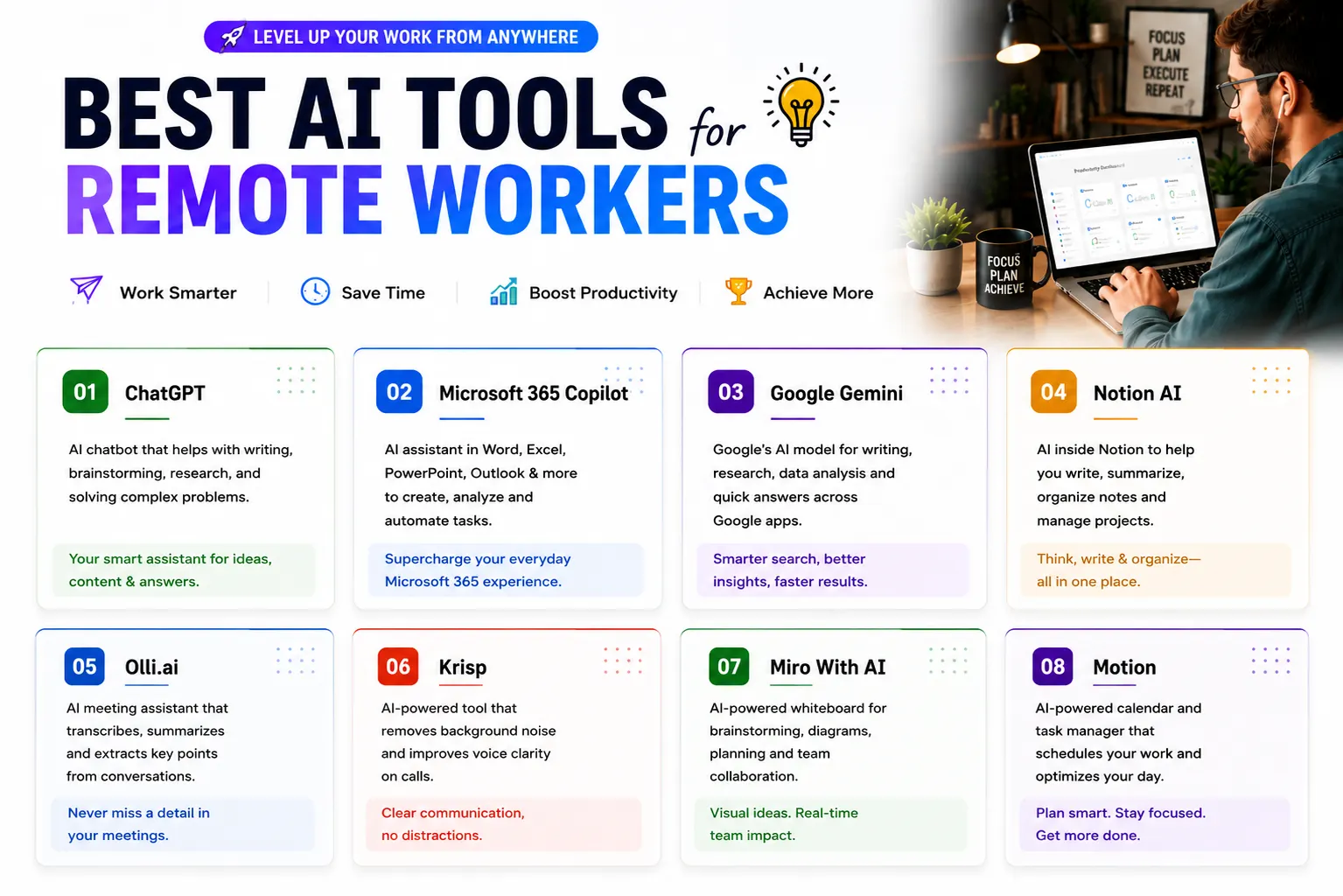
8 Best AI Tools for Remote Workers in 2026
Here List of top ai tools for remote workers:
1. ChatGPT
If you are working remotely, you must have lots to write more than you think.
Emails. Reports. Messages. Proposals. Documentation. Some days you just sit there thinking, “How do I even start this?”
That’s where ChatGPT helps. You don’t need perfect words. Just type your rough idea and Ai-powered productivity tools shape it properly.
It’s great for:
- Drafting emails quickly.
- Summarizing meeting notes.
- Turn messy ideas into clear content.
- Explaining really simple language.
It honestly feels like someone’s sitting next to you saying, “Relax, we’ll fix this together.” It simply makes your things really easy. But you still have to be really careful when it is about confidential data. Do not ever share things with anyone, and always follow your company’s rules.
2. Microsoft 365 Copilot
If you sit the whole day with Outlook, Excel, and PowerPoint, you just feel tired. Not physically, but mentally. You open one email, and suddenly it turns into this long chain.
New replies keep coming. And when you actually read them, most of them are saying the same thing again and again. At that point, you’re not even thinking about the work anymore. You’re just thinking, “Why is this so long for no reason?”
At that point, you really do not care about all the discussion. You just want to know the main point. Copilot helps you here. AI tools for teams simply give you a fast, clear summary. This way, you will not scroll and do the important thing.
3. Google Gemini
If you use Google Docs every day, this feels natural. You open a long document before a meeting and think, “Do I really have to read all of this?” Gemini, AI tools for productivity, can summarize it in seconds.
It also helps rewrite sentences when your writing feels unclear or repetitive. It’s like that friend who reads everything fast and tells you the main points. Still, you always double-check important details.
4. Notion AI
Remote work without organization becomes chaos very quickly. Notes everywhere. Tasks scattered. Ideas half-written. Notion workplace AI tools help turn random notes into clear action steps.
After a meeting, instead of manually creating tasks, you can ask it to generate them. Instead of staring at a blank project page, AI tools for professionals give you a structure. It doesn’t feel fancy. It just feels organized. And honestly, that’s what most remote workers need.
5. Otter.ai
Taking notes during meetings is exhausting. You try to listen carefully.
Additionally, you try to write important points. You miss something. Then you ask someone later, “Wait, what did they say about the deadline?”
Otter solves that. AI productivity software records the meeting and gives you a transcript and summary. After the call, you can actually focus on decisions instead of remembering what was said. If you attend back-to-back meetings, this is a lifesaver.
6. Krisp
We just talk about real life now. Sometimes your neighbor drills the wall during your client call. Sometimes dogs bark. Also, sometimes traffic noise ruins your audio. Krisp removes background noise in real time.
Your voice stays clear. The meeting sounds professional. It’s a small thing, but it improves how people experience you. And in remote work, perception matters.
7. Miro With AI
Brainstorming online can feel awkward. Everyone talks at once. Ideas get lost. No one knows what the final plan is. Miro gives you a visual board. And with AI tools for remote work, it can organize ideas into structured plans. Instead of messy thoughts, you get a roadmap. Artificial Intelligence tools are especially helpful for creative teams or strategy sessions.
8. Motion
Time management is literally the quite tough part of a remote job. There is no one who can keep an eye on you. No fixed office environment. Deadlines still exist. Motion takes your tasks and automatically schedules them in your calendar.
If something urgently needs to change, AI workflow tools rearrange your day. You do not have to decide like what to do next every hour, your schedule already tells you from the motion app. It removes decision fatigue. And that alone improves productivity.
A Simple Truth About AI Tools
AI tools for remote teams won’t magically make you productive. But they reduce friction. They remove small repetitive decisions. They help you move faster. They clear mental clutter. And when your mind feels less cluttered, you work better. Do not just download everything in the beginning.
You can start with AI productivity tools that really solve your biggest daily frustration. If you think writing takes too long, you can use ChatGPT. If meetings drain you, you can use Otter. If planning feels messy, you can use Motion or Notion.
Conclusion
In 2026, doing remote work is not just about working more hours. It’s about working with less mental pressure. The best AI tools for remote work don’t make you dependent. They make your systems stronger.
And when your systems are strong, your work feels lighter. You don’t end your day thinking, “I was busy all day but did nothing.” You end your day knowing what moved forward. That’s the real productivity.