
Creating high-quality images no longer requires advanced design skills or expensive software. With the help of an AI image generator, anyone can turn a simple text prompt into illustrations, digital artwork, product photos, marketing visuals, logos, concept art, and even photorealistic scenes within seconds.
Over the last few years, AI image generation has improved significantly. Modern models understand detailed instructions, produce more realistic results, generate readable text inside images, and support advanced editing features like inpainting, outpainting, and AI photo editing. Whether you’re a designer, marketer, content creator, business owner, educator, or hobbyist, there are now plenty of AI image generator tools designed to match different creative needs.
However, not every tool delivers the same experience. Some focus on artistic images, while others are built for branding, advertising, social media graphics, or commercial design. Pricing, image quality, editing options, licensing, and ease of use also vary from one platform to another.
In this guide, you’ll discover the 16 best AI image generator tools available in 2026, including their latest versions, standout features, ideal use cases, pricing models, and how they compare with one another. You’ll also learn how text-to-image generation works, what to look for when choosing a platform, and practical tips for writing better prompts to achieve more accurate and creative results.
Whether you’re searching for the best AI image generator for personal creativity or professional projects, this guide will help you choose the right tool with confidence.
What is an AI Image Generator and How Does It Work?
➤ What Is an AI Image Generator?
An AI image generator is software that creates images from text descriptions or other visual inputs using generative AI. Instead of drawing or editing graphics manually, users simply describe what they want, and the system generates an original image based on that prompt.
For example, a prompt like:
“A modern wooden cabin beside a mountain lake during sunrise with soft golden light and realistic reflections.”
can be transformed into a detailed image within seconds.
Today’s AI image generation tools are capable of producing many different types of visuals, including:
- Digital artwork
- Photorealistic portraits
- Product mockups
- Social media graphics
- Marketing creatives
- Book and magazine illustrations
- Concept art
- Logos and icons
- Backgrounds and wallpapers
- Character designs
Many modern platforms also go beyond simple image creation. They include features such as:
- Image editing with AI
- Background removal
- Object replacement
- Style transfer
- Image expansion
- Generative fill
- Image-to-image generation
- Upscaling and enhancement
As these capabilities continue to improve, AI-generated images are becoming a practical solution for businesses, creative professionals, educators, and individuals who need high-quality visuals without spending hours designing them from scratch.
➤ How Does an AI Image Generator Work?
Most modern AI image generator software relies on advanced machine learning models that have been trained on large collections of images and text descriptions. During training, these models learn the relationship between language and visual elements such as objects, colors, lighting, textures, composition, and artistic styles.
When you enter a prompt, the system analyzes the words and converts them into visual concepts. It then uses an image generation model to create a completely new image that matches the description as closely as possible.
Although each platform uses its own technology, the overall process usually follows these steps:
| Step | What Happens |
|---|---|
| Prompt Input | You describe the image you want using natural language. |
| Prompt Understanding | The AI interprets objects, styles, lighting, colors, camera angles, and other details. |
| Image Generation | The model creates a brand-new image based on your instructions. |
| Refinement | Some platforms allow editing, regeneration, or enhancement until you’re satisfied. |
Many leading platforms now use advanced diffusion models, which gradually build an image from random visual noise into a detailed final result. This approach has greatly improved realism, texture quality, lighting accuracy, and overall consistency.
Several modern platforms are also becoming multimodal AI systems. Instead of working only with text, they can understand text, existing images, sketches, and reference photos together. This makes it easier to edit images, create variations, or generate visuals that closely match a desired style.
The quality of the final output still depends heavily on the prompt you provide. Clear and descriptive AI image prompts generally produce better results than short or vague instructions. That’s why learning a few prompt-writing techniques can significantly improve the quality and consistency of your generated images.
Why Are AI Image Generators Popular in 2026?
AI image generation has become a practical solution for both individuals and businesses. What started as an experimental technology is now part of everyday creative work. Designers use it to speed up workflows, marketers create campaign visuals in minutes, and entrepreneurs generate product images without expensive photoshoots.
The biggest reason behind this growth is that today’s tools produce better results while requiring less effort. Most platforms are faster, easier to use, and capable of creating professional-quality visuals from simple text prompts.
Let’s look at the key reasons why AI image generators have become so popular in 2026.
✦ Advancements in AI Models and Image Quality
Recent improvements in generative AI have dramatically increased image quality. Modern image generation models understand prompts more accurately and produce images with realistic lighting, textures, shadows, reflections, and facial expressions.
Many platforms can now generate:
- Photorealistic portraits
- Detailed landscapes
- Product mockups
- Digital illustrations
- Concept art
- Marketing graphics
- High-resolution commercial visuals
Another major improvement is consistency. Earlier tools often produced distorted hands, incorrect anatomy, or unrealistic objects. Newer diffusion models have significantly reduced these issues, making AI-generated images much more reliable for professional use.
Several platforms also support image editing features such as:
- Object removal
- Background replacement
- Generative fill
- Style transfer
- Image expansion
- Image-to-image generation
These improvements allow creators to refine images instead of generating them from scratch every time.
✦ Growing Use Across Marketing, Content Creation, and E-commerce
Businesses are adopting AI image generation tools because they help create visual content faster while reducing production costs.
Marketing teams use AI to create:
- Social media graphics
- Display advertisements
- Blog illustrations
- Email campaign visuals
- Landing page banners
- Presentation graphics
Content creators rely on AI image creator platforms to produce eye-catching thumbnails, infographics, and custom illustrations for articles and videos.
E-commerce businesses are also benefiting from AI by generating:
- Product lifestyle images
- Promotional banners
- Product mockups
- Seasonal campaign visuals
Instead of organizing multiple photoshoots, businesses can quickly create new variations for different campaigns. This makes AI especially useful for startups and small businesses with limited design budgets.
✦ Faster Image Generation and Better Accessibility
One of the biggest advantages of modern AI image generator tools is speed.
Tasks that once required hours of design work can now be completed within minutes. Users simply enter a prompt, review the generated images, and make adjustments if needed.
Most platforms also provide:
- Beginner-friendly interfaces
- Ready-made prompt templates
- Multiple image variations
- One-click editing tools
- Cloud-based access without complex installation
Many providers now offer a free AI image generator plan or trial credits, allowing users to experiment before upgrading to paid subscriptions.
This accessibility has made AI image generation useful for:
- Students
- Freelancers
- Bloggers
- Small business owners
- Marketing professionals
- Designers
- Educators
- Content creators
Even users with little or no design experience can create professional-looking visuals with minimal effort.
✦ Integration With Creative Tools and Workflows
Modern AI platforms are no longer standalone image generators. Many integrate directly with popular design, editing, and productivity software, making them easier to include in existing creative workflows.
For example, several tools now support:
- AI-assisted image editing
- Graphic design workflows
- Team collaboration
- Brand asset management
- Cloud storage integration
- Design templates
- Export in multiple formats
Some platforms also provide an AI image generation API, allowing developers to integrate image creation into websites, applications, or internal business systems.
These integrations help creative teams work more efficiently by reducing repetitive design tasks and shortening production timelines. Instead of switching between multiple applications, users can generate, edit, and export visuals from a connected workflow.
As a result, AI-powered creative tools are becoming a regular part of design, marketing, publishing, and digital content production across industries.
16 Best AI Image Generator Tools in 2026
With so many AI image generation platforms available, choosing the right one depends on your goals, budget, and workflow. Some tools are designed for photorealistic images, while others focus on illustrations, branding, graphic design, or commercial content creation.
Below are the 16 best AI image generator tools in 2026, along with their latest versions, standout features, and ideal use cases.
- Midjourney
- ChatGPT
- Google Gemini
- Flux
- Adobe Firefly
- Ideogram
- Seedream
- Recraft
- Kling AI
- Stable Diffusion
- Leonardo AI
- Canva AI
- Freepik AI
- Microsoft Designer
- Luma AI
- Runway ML
1. Midjourney
Midjourney continues to be one of the most popular choices for creating artistic and highly detailed visuals. Its latest Version 8.2 delivers improved realism, better prompt understanding, and greater consistency across generated images. Although it doesn’t offer a free plan, many creative professionals consider it one of the best AI image generators for high-quality artwork.
Best Features :
- Exceptional image quality with rich details
- Excellent artistic and cinematic styles
- Strong prompt interpretation
- High-resolution image generation
- Active community for prompt inspiration
Best For :
- Digital artists
- Illustrators
- Concept designers
- Creative agencies
- Marketing visuals requiring premium quality
2. ChatGPT
ChatGPT Images 2.0 combines conversational AI with advanced image generation, making it easy to create and refine visuals through natural language. Instead of rewriting prompts multiple times, users can simply ask for changes in a conversation.
Best Features :
- Conversational image editing
- Excellent prompt understanding
- Realistic and creative image generation
- Supports image refinement through chat
- Easy for beginners
Best For :
- Content creators
- Bloggers
- Social media managers
- Students
- Everyday creative projects
3. Google Gemini
Google Gemini Image has become a strong competitor thanks to its speed, quality, and integration with Google’s AI ecosystem. It creates realistic images quickly while supporting natural language instructions.
Best Features :
- Fast image generation
- Accurate prompt interpretation
- High-quality realistic images
- Seamless integration with Google AI services
- Free daily image generation limits
Best For :
- General users
- Business presentations
- Marketing teams
- Educational content
- Everyday design work
4. Flux
Developed by Black Forest Labs, Flux has gained popularity among developers and creative professionals because of its impressive image quality and flexible deployment options. Users can run open-source versions locally or access hosted services.
Best Features :
- Excellent photorealistic output
- Open-source availability
- Strong image consistency
- Flexible deployment options
- Developer-friendly ecosystem
Best For :
- Developers
- Researchers
- Open-source enthusiasts
- Commercial AI projects
- Custom image generation workflows
5. Adobe Firefly
Adobe Firefly is designed for creators who already work with Adobe Creative Cloud. It focuses on commercially safe content generation while offering powerful editing features directly inside Adobe applications.
Best Features :
- Commercial-friendly content generation
- Integration with Photoshop and Illustrator
- Advanced generative fill tools
- Background replacement
- Text effects and image editing
Best For :
- Graphic designers
- Marketing agencies
- Brand teams
- Professional creatives
- Adobe Creative Cloud users
6. Ideogram
Ideogram has become one of the strongest platforms for generating images that include readable text. Whether you’re creating posters, banners, logos, or social media graphics, it handles typography better than many competitors.
Best Features :
- Excellent text rendering
- Clean typography generation
- High-quality illustrations
- Multiple artistic styles
- Fast image generation
Best For :
- Logo creation
- Posters
- Advertising creatives
- Social media graphics
- Brand design
7. Seedream
Seedream by ByteDance offers fast image generation with improved realism and creative flexibility. Its latest version produces attractive visuals suitable for marketing, entertainment, and social media content.
Best Features :
- High-quality realistic images
- Fast generation speed
- Multiple creative styles
- Easy-to-use interface
- Daily free image generation
Best For :
- Social media creators
- Digital marketers
- Small businesses
- Creative professionals
- Advertising campaigns
8. Recraft
Recraft is designed specifically for designers who need scalable graphics, illustrations, icons, and branding assets. It offers greater control over visual elements than many general-purpose image generators.
Best Features :
- Excellent vector graphics support
- Consistent brand assets
- AI-assisted illustration tools
- Icon and logo generation
- Professional editing capabilities
Best For :
- UI/UX designers
- Brand designers
- Marketing teams
- Illustration projects
- Graphic design professionals
9. Kling AI
Kling AI has quickly expanded from AI video generation into high-quality image creation. Its image model focuses on realism, cinematic lighting, and detailed compositions, making it a popular choice for creators who work with both images and videos.
Best Features :
- Generates highly realistic images
- Strong cinematic lighting and composition
- Supports both image and video workflows
- Easy-to-use interface
- Produces detailed character and environment designs
Best For :
- Content creators
- Filmmakers
- Marketing teams
- Social media campaigns
- Creative storytelling
10. Stable Diffusion
Stable Diffusion remains one of the most flexible AI image generation software options available. Being open source, it allows users to customize models, fine-tune outputs, and even run image generation on their own hardware.
Best Features :
- Open-source ecosystem
- Large community support
- Highly customizable models
- Local deployment options
- Wide range of extensions and plugins
Best For :
- Developers
- AI researchers
- Technical users
- Businesses requiring custom solutions
- Advanced creative projects
11. Leonardo AI
Leonardo AI has become a favorite among designers and game developers because of its specialized models for illustrations, concept art, and assets. It also provides useful editing tools that simplify creative workflows.
Best Features :
- High-quality concept art generation
- Built-in editing tools
- Multiple AI models for different styles
- Fast generation speeds
- Daily free tokens
Best For :
- Game developers
- Illustrators
- Character designers
- Creative professionals
- Concept artists
12. Canva AI
Canva AI brings AI image generation directly into one of the world’s most popular design platforms. Users can generate images and immediately add them to presentations, social media posts, posters, or marketing materials without switching between different applications.
Best Features :
- Integrated with Canva’s design editor
- Beginner-friendly interface
- Magic Media image generation
- Access to templates and design assets
- One-click editing and resizing
Best For :
- Small businesses
- Students
- Content creators
- Social media managers
- Marketing teams
13. Freepik AI
Freepik AI combines image generation with one of the largest libraries of design resources. It allows users to create new visuals while also accessing icons, vectors, templates, and stock assets from a single platform.
Best Features :
- AI image creation alongside design resources
- Large collection of templates
- Image enhancement tools
- Fast generation
- Easy export options
Best For :
- Graphic designers
- Marketing professionals
- Agencies
- Bloggers
- Creative teams
14. Microsoft Designer
Microsoft Designer offers a simple way to generate visuals using AI while staying connected with Microsoft’s productivity ecosystem. It is particularly useful for users who want quick graphics for presentations, documents, or social media.
Best Features :
- Free image generation with a Microsoft account
- Simple prompt-based interface
- Built-in design suggestions
- Social media templates
- Easy integration with Microsoft services
Best For :
- Office users
- Students
- Small businesses
- Presentation design
- Everyday content creation
15. Luma AI
Luma AI is best known for creating realistic 3D content, but its latest image model also produces impressive still images with excellent lighting and depth. It is especially useful for creators working on visual storytelling and product visualization.
Best Features :
- Realistic lighting effects
- High-quality image generation
- Excellent depth and texture
- Creative scene generation
- Supports both images and 3D workflows
Best For :
- Product designers
- Architects
- Creative studios
- Visual storytellers
- 3D artists
16. Runway ML
Runway ML has established itself as a powerful creative platform for both image and video generation. Its latest image model delivers professional-quality visuals while offering advanced editing capabilities that fit seamlessly into modern production workflows.
Best Features :
- Professional image editing tools
- High-quality visual generation
- Fast rendering performance
- AI-assisted editing features
- Integrated creative workflow
Best For :
- Creative agencies
- Video editors
- Marketing professionals
- Design teams
- Professional content creators
Comparison of the Best AI Image Generator Tools in 2026
The table below provides a quick comparison of the leading AI image generators based on their latest versions, pricing model, and ideal use cases.
| AI Platform / Company | Main Platform | Latest Current Version (Final) | Model Type | Availability |
|---|---|---|---|---|
| Midjourney | Midjourney | Midjourney Version 8.2 (V8.2) | Paid | No free plan |
| OpenAI | ChatGPT Images | ChatGPT Images 2.0 | Freemium |
Free (limited) • Plus available
|
| Google Gemini Image | Gemini 3.1 Flash Image (Nano Banana 2) | Freemium |
Free with daily limits
|
|
| Black Forest Labs | Flux | FLUX.3 (Omni Image & Video) | Freemium / Open Source |
Free self-hosted & hosted options
|
| Adobe | Adobe Firefly | Firefly Image Model 5 | Freemium |
Monthly free credits
|
| Ideogram | Ideogram | Ideogram 3 (Best for Text) | Freemium |
Limited free credits
|
| ByteDance | Seedream | Seedream 5.0 Pro | Freemium |
Free access (availability may vary)
|
| Recraft | Recraft | Recraft V4 | Freemium |
Daily free credits
|
| Kling AI | Kling | Kling O1 Image | Freemium |
Daily free credits
|
| Stability AI | Stable Diffusion | Stable Diffusion 3.5 Large | Open Source |
Free self-hosted & paid APIs
|
| Leonardo AI | Leonardo AI | Leonardo Phoenix | Freemium |
Daily free tokens
|
| Canva AI | Canva AI | Canva Magic Media | Freemium |
Limited free credits
|
| Freepik AI | Freepik AI | Freepik Mystic | Freemium |
Limited free generations
|
| Microsoft | Microsoft Designer | Designer Image Creator | Free / Freemium |
Free with Microsoft account
|
| Luma AI | Luma Dream Machine | Luma Photon | Freemium | Trial/free credits |
| Runway | Runway ML | Runway Gen-3 Alpha Image | Freemium |
Limited free credits
|
This comparison offers a quick overview, but the right tool ultimately depends on your workflow, budget, and creative goals. In the next section, we’ll explore the key factors to consider before choosing one.
How to Choose the Best AI Image Generator for Your Needs
Choosing the right AI image generator depends on what you want to create and how you plan to use it. While some tools are built for artistic creations, others focus on business graphics, marketing assets, product images, or professional design workflows.
Before selecting a platform, consider the following factors.
► Image Quality and Realism
Image quality should be your first priority. The best tools produce sharp, detailed, and visually consistent results, even when prompts become more complex.
When comparing platforms, pay attention to:
- Realistic lighting and shadows
- Natural-looking faces and hands
- Fine textures and details
- Accurate colors
- Consistent backgrounds
- High-resolution image output
If your work involves advertising, product marketing, or client projects, choose a professional AI image generator known for producing photorealistic results rather than artistic interpretations.
► Ease of Use
Not everyone using an AI image generator is a designer. A simple interface can make a huge difference, especially for beginners.
Look for platforms that offer:
- Clean and intuitive dashboards
- Prompt suggestions
- Easy image editing
- One-click downloads
- Built-in templates
- Fast learning curve
If you’re just starting with AI image generation, beginner-friendly tools like ChatGPT, Canva AI, and Microsoft Designer are easier to learn than platforms with advanced settings.
► Pricing and Free vs. Paid Plans
Budget is another important consideration. Many platforms provide a free AI image generator plan with limited daily generations, while paid plans unlock higher image quality, faster generation speeds, additional editing features, and commercial rights.
Here’s a general comparison:
| Feature | Free Plans | Paid Plans |
|---|---|---|
| Daily image generations | Limited | Higher or unlimited |
| Image resolution | Standard | High resolution |
| Generation speed | Normal | Faster priority access |
| Editing features | Basic | Advanced editing tools |
| Commercial use | May be restricted | Usually included |
| Watermarks | Sometimes | Usually removed |
If you create images regularly for work, investing in a paid AI image generator can save time and provide more flexibility.
► Commercial Usage Rights
If you plan to use AI-generated images for business, advertising, websites, client projects, or products, always review the platform’s licensing policy.
Check whether the tool allows:
- Commercial use
- Client work
- Selling generated images
- Print-on-demand products
- Marketing campaigns
- Brand assets
Some platforms offer broader commercial rights than others, and licensing terms may vary depending on your subscription plan. It’s also a good idea to understand the platform’s policies regarding AI image copyright and AI image licensing before using generated content commercially.
► Editing and Customization Features
Image generation is only part of the creative process. Many users also need to modify or improve their images after they’re created.
Useful editing features include:
- Background removal
- Object replacement
- Generative fill
- Image expansion
- Style transfer
- Color adjustments
- AI upscaling
- Image-to-image generation
The more editing options a platform provides, the easier it becomes to refine your visuals without using separate design software.
► API and Third-Party Integrations
Businesses and developers often need image generation to fit into existing workflows. In these cases, API support becomes an important feature.
An AI image generation API allows developers to integrate image creation directly into websites, mobile apps, design platforms, or internal business systems.
You may also benefit from integrations with:
- Design software
- Cloud storage
- Content management systems
- Marketing platforms
- Team collaboration tools
These integrations help automate repetitive tasks and improve productivity.
► Generation Speed and Performance
Fast image generation is especially valuable when working on deadlines or creating multiple image variations.
When comparing tools, consider:
- Average generation time
- Queue waiting time
- Reliability during peak hours
- Batch image generation
- Overall platform stability
Many premium platforms offer priority processing, allowing subscribers to generate images much faster than users on free plans.
Ultimately, the best choice is the one that balances image quality, ease of use, editing capabilities, pricing, and performance based on your specific needs.
How to Write Better AI Image Prompts and Get Better Results
Even the most advanced AI model depends on the quality of your prompt. A clear, detailed prompt gives the model better instructions, resulting in more accurate and visually appealing images.
Here are a few practical tips to improve your prompts.
♦ Be Specific and Descriptive
Avoid short prompts like:
A cat
Instead, provide enough context for the model to understand exactly what you want.
For example:
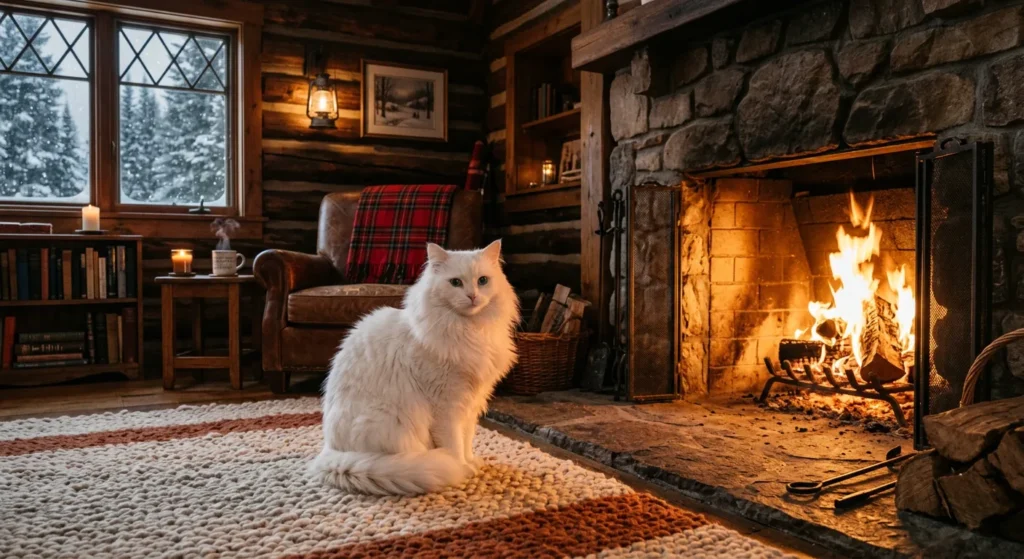
A fluffy white cat sitting beside a fireplace in a cozy wooden cabin during winter, warm lighting, realistic style.
Include details such as:
- Subject
- Environment
- Colors
- Mood
- Time of day
- Camera angle
- Art style
The more relevant details you provide, the better the output is likely to be.
♦ Use Style, Lighting, and Composition Keywords
Small additions to your prompt can dramatically improve image quality.
You can describe:
Style
- Watercolor
- Oil painting
- Minimalist
- Digital illustration
- Anime
- Realistic
- Fantasy
- Cyberpunk
Lighting
- Golden hour
- Soft lighting
- Studio lighting
- Cinematic lighting
- Neon lighting
- Natural daylight
Composition
- Close-up
- Portrait
- Wide-angle
- Bird’s-eye view
- Symmetrical composition
- Depth of field
These details help guide the model toward the visual style you have in mind.
♦ Experiment With Prompt Modifiers
Don’t hesitate to refine your prompts if the first result isn’t exactly what you expected.
Try changing:
- Artistic style
- Color palette
- Camera perspective
- Level of detail
- Mood
- Background
- Aspect ratio
Generating multiple variations and making small adjustments often produces better results than completely rewriting the prompt from scratch.
♦ Avoid Common Prompting Mistakes
Many users struggle because their prompts are too short or too vague.
Here are some common mistakes to avoid:
- Using only one or two words
- Giving conflicting instructions
- Requesting too many unrelated elements in one image
- Ignoring image style
- Forgetting lighting or composition details
- Expecting perfect results from the first attempt
Writing effective prompts is a skill that improves with practice. Over time, you’ll learn which descriptions produce the best results for your preferred platform.
Final Verdict
The quality of AI image generation tools has improved significantly in 2026, giving creators more options than ever before. Whether you’re designing marketing materials, creating social media content, producing digital artwork, or generating visuals for business, there’s a platform suited to your workflow.
If artistic quality is your priority, Midjourney remains an excellent choice. For conversational image creation and editing, ChatGPT offers one of the most user-friendly experiences. Adobe Firefly stands out for commercial design, Stable Diffusion provides unmatched flexibility for developers, and Canva AI simplifies image creation for everyday users.
Instead of looking for a single tool that does everything, think about your goals, budget, and the features you use most often. Many platforms offer free plans or trial credits, making it easy to experiment before committing to a subscription.
As AI continues to evolve, image generation will become even more accurate, faster, and deeply integrated into creative workflows. Choosing the right platform today can help you save time, improve productivity, and create professional-quality visuals with confidence.
FAQs
What is the best AI image generator in 2026?
The answer depends on your needs. Midjourney is widely recognized for artistic image quality, ChatGPT offers an intuitive conversational experience, Adobe Firefly is well suited for commercial design projects, and Stable Diffusion remains a top choice for developers who need customization.
Which AI image generator is free?
Several platforms offer free plans or daily credits, including ChatGPT, Google Gemini, Canva AI, Microsoft Designer, Leonardo AI, Recraft, Ideogram, and Freepik AI. Free plans usually include usage limits or reduced features.
Can I use AI-generated images for commercial purposes?
Many platforms allow commercial use, but the rights vary depending on the provider and your subscription plan. Always review the licensing terms before using generated images in advertisements, client work, products, or other commercial projects.
Which AI image generator creates the most realistic images?
Midjourney, FLUX, ChatGPT Images, Google Gemini, and Adobe Firefly are among the strongest options for creating realistic and high-quality images with accurate lighting, textures, and fine details.
Do I need design experience to use an AI image generator?
No. Most modern tools are designed for users of all skill levels. With simple text prompts and beginner-friendly interfaces, anyone can create impressive visuals without prior design experience.
What makes a good AI image prompt?
A good prompt clearly describes the subject, style, lighting, colors, composition, and overall mood. The more specific your instructions are, the more accurate the generated image is likely to be.
Thank you for reading this blog! If you found it helpful, please consider sharing it with your friends, colleagues, or anyone working in graphic design or interested in AI image generation. Your support helps us create more valuable and informative content. Thank you!